Test
TEst
Shared 8/4/2025
195 views
Visual Workflow
JSON Code
{
"meta": {
"instanceId": "408f9fb9940c3cb18ffdef0e0150fe342d6e655c3a9fac21f0f644e8bedabcd9"
},
"nodes": [
{
"id": "bd94ff7b-0f66-45f7-bbab-bb2be0406532",
"name": "When clicking ‘Execute workflow’",
"type": "n8n-nodes-base.manualTrigger",
"position": [
-540,
320
],
"parameters": {},
"typeVersion": 1
},
{
"id": "fdd66c07-8168-4f94-8ff5-ba4ceed476a9",
"name": "Get Image Contents",
"type": "n8n-nodes-base.set",
"position": [
1400,
320
],
"parameters": {
"options": {},
"assignments": {
"assignments": [
{
"id": "021aad70-de11-4387-844e-7e7dfd3b1044",
"name": "image",
"type": "string",
"value": "={{ $json.candidates[0].content.parts.find(part => part.inlineData).inlineData.data }}"
},
{
"id": "62877ef7-2057-4d35-a44b-1d58fa1f1769",
"name": "mimeType",
"type": "string",
"value": "={{ $json.candidates[0].content.parts.find(part => part.inlineData).inlineData.mimeType }}"
}
]
}
},
"typeVersion": 3.4
},
{
"id": "e23db650-d0fa-4d87-87ea-3ab2e78292d8",
"name": "Upload to Drive",
"type": "n8n-nodes-base.googleDrive",
"position": [
2020,
320
],
"parameters": {
"name": "=file_restored_{{ $itemIndex }}.{{ $binary.data.fileExtension }}",
"driveId": {
"__rl": true,
"mode": "list",
"value": "My Drive"
},
"options": {},
"folderId": {
"__rl": true,
"mode": "list",
"value": "root",
"cachedResultName": "/ (Root folder)"
}
},
"credentials": {
"googleDriveOAuth2Api": {
"id": "yOwz41gMQclOadgu",
"name": "Google Drive account"
}
},
"typeVersion": 3
},
{
"id": "0a8bd3f0-a6e9-4862-942c-20ce336ab24e",
"name": "Sticky Note2",
"type": "n8n-nodes-base.stickyNote",
"position": [
1020,
60
],
"parameters": {
"color": 7,
"width": 640,
"height": 460,
"content": "## 2. Use Gemini LLM to Compose Images Together\n[Read more about Gemini's Text and Image to Image Editing](https://ai.google.dev/gemini-api/docs/image-generation#gemini-image-editing)\n\nComposing or \"Stitching\" images together may not seem particularly exciting but with Text-and-image-to-image capability, we can instruct the AI on \"how\" to put the images together. This is incredibly powerful feature when you need to use existing imagery or graphics in new pieces of work."
},
"typeVersion": 1
},
{
"id": "8a87bcea-7b60-46d8-9070-380397d9d0d8",
"name": "Convert to File",
"type": "n8n-nodes-base.convertToFile",
"onError": "continueRegularOutput",
"position": [
1820,
320
],
"parameters": {
"options": {
"mimeType": "={{ $json.mimeType }}"
},
"operation": "toBinary",
"sourceProperty": "image"
},
"typeVersion": 1.1
},
{
"id": "0ea0a3bf-e4fb-4beb-8a02-405602e17558",
"name": "Sticky Note3",
"type": "n8n-nodes-base.stickyNote",
"position": [
1700,
60
],
"parameters": {
"color": 7,
"width": 560,
"height": 460,
"content": "## 3. Upload to Google Drive\n[Read more about Google Drive node](https://docs.n8n.io/integrations/builtin/app-nodes/n8n-nodes-base.googledrive)\n\nGemini outputs the image data as a base64 string so conversion to binary is sometimes necessary such as when uploading to Google Drive. We're using Google drive here but you can upload to any destination of your choosing."
},
"typeVersion": 1
},
{
"id": "f6f9410f-f3ef-4b7b-88fe-774c30fe4e29",
"name": "Extract from File",
"type": "n8n-nodes-base.extractFromFile",
"position": [
600,
320
],
"parameters": {
"options": {},
"operation": "binaryToPropery"
},
"typeVersion": 1
},
{
"id": "c41e5653-bd37-4b17-9226-e9edf3d58899",
"name": "Merge1",
"type": "n8n-nodes-base.merge",
"position": [
380,
320
],
"parameters": {
"numberInputs": 3
},
"typeVersion": 3.2
},
{
"id": "0fe5cc27-e378-4a62-8477-1b666c4dcbe6",
"name": "Aggregate1",
"type": "n8n-nodes-base.aggregate",
"position": [
820,
320
],
"parameters": {
"options": {},
"aggregate": "aggregateAllItemData"
},
"typeVersion": 1
},
{
"id": "cd489b5f-0447-4d3e-84d1-a22142d02708",
"name": "Character",
"type": "n8n-nodes-base.httpRequest",
"position": [
-300,
120
],
"parameters": {
"url": "https://res.cloudinary.com/daglih2g8/image/upload/f_auto,q_auto/v1/n8n-workflows/qwitjyhejockuxfvkk5g",
"options": {}
},
"typeVersion": 4.2
},
{
"id": "74e05106-26c0-4d59-adf9-274f2a1ddd7b",
"name": "Dalmation",
"type": "n8n-nodes-base.httpRequest",
"position": [
-180,
320
],
"parameters": {
"url": "https://res.cloudinary.com/daglih2g8/image/upload/f_auto,q_auto/v1/n8n-workflows/gxcc0xnghpbthwt8fpec",
"options": {}
},
"typeVersion": 4.2
},
{
"id": "2bd84982-3984-4c22-a3de-0c871f5bc2ea",
"name": "Sticky Note",
"type": "n8n-nodes-base.stickyNote",
"position": [
2300,
60
],
"parameters": {
"width": 480,
"height": 540,
"content": "## Final Output\n"
},
"typeVersion": 1
},
{
"id": "4e3155bf-983b-46b4-b6cb-38278edc34fb",
"name": "Sticky Note1",
"type": "n8n-nodes-base.stickyNote",
"position": [
-300,
-180
],
"parameters": {
"width": 220,
"height": 280,
"content": "## Character\n"
},
"typeVersion": 1
},
{
"id": "01486147-0ddf-4055-9ebf-5bc6a884852c",
"name": "Sticky Note4",
"type": "n8n-nodes-base.stickyNote",
"position": [
-40,
120
],
"parameters": {
"height": 300,
"content": "## Dalmation\n"
},
"typeVersion": 1
},
{
"id": "e2153852-33b3-41dc-adcf-122027ada5a6",
"name": "Sticky Note5",
"type": "n8n-nodes-base.stickyNote",
"position": [
-180,
520
],
"parameters": {
"height": 300,
"content": "## Sofa\n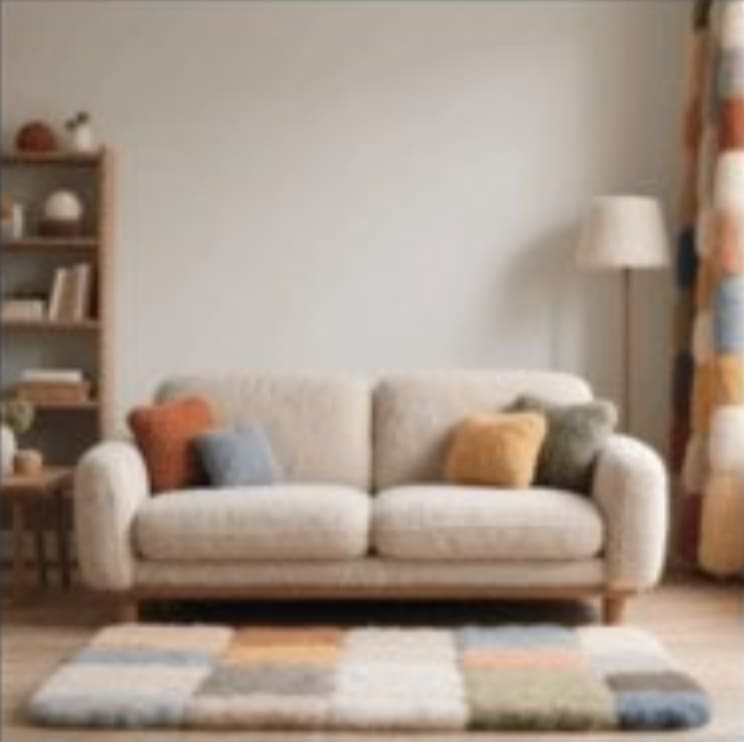"
},
"typeVersion": 1
},
{
"id": "510619c4-1e9c-4466-95f1-5eaa72d6ecc5",
"name": "Sofa",
"type": "n8n-nodes-base.httpRequest",
"position": [
100,
520
],
"parameters": {
"url": "https://res.cloudinary.com/daglih2g8/image/upload/f_auto,q_auto/v1/n8n-workflows/nyghscauxtcfl4dve6of",
"options": {}
},
"typeVersion": 4.2
},
{
"id": "522cdb05-558c-4bd4-a4af-1a400bc641f9",
"name": "Sticky Note6",
"type": "n8n-nodes-base.stickyNote",
"position": [
300,
60
],
"parameters": {
"color": 7,
"width": 680,
"height": 460,
"content": "## 1. Convert Separate Images to Base64 Strings\n[Read more about the Extract from File node](https://docs.n8n.io/integrations/builtin/core-nodes/n8n-nodes-base.extractfromfile)\n\nTo use our images in this workflow, we will need to convert the binary data to base64 strings. This is later passed to the Gemini API to work on."
},
"typeVersion": 1
},
{
"id": "ce28bdf0-a03e-486c-9dd4-2aeb0896519e",
"name": "Sticky Note7",
"type": "n8n-nodes-base.stickyNote",
"position": [
-1080,
-220
],
"parameters": {
"width": 460,
"height": 960,
"content": "## Try It Out!\n### This n8n template demonstrates how to use AI to compose or \"stitch\" separate images together to generate a new image which retains the source assets and consistent style.\n\nUse cases are many: Try producing storyboard scenes with consistent characters, marketing material with existing product assets or trying on different articles on fashion!\n\n### How it works\n* We'll import our required assets via our Cloud storage using the HTTP node.\n* The images are then converted to base64 strings and aggregated so we can use it for our AI model.\n* Gemini's image generation model is used which takes all 3 images and a prompt that we define. Our prompt instructs the model on how to compose the final image.\n* Gemini generates a new image but uses the original 3 assets to do so. The consistency to the source images is very high and shows little signs of hallucinations!\n* Gemini's output is base64 so we use a \"Convert to file\" node to convert the data to binary.\n* The final binary image is then uploaded to Google Drive to complete the demonstration.\n\n### How to use\n* The manual trigger node is used as an example but feel free to replace this with other triggers such as webhook or even a form.\n* Technically, you should be able to compose even more images but of course, the generation will take longer and cost more.\n\n### Requirements\n* Gemini account for LLM and Image generation\n* Google drive for upload\n\n\n### Need Help?\nJoin the [Discord](https://discord.com/invite/XPKeKXeB7d) or ask in the [Forum](https://community.n8n.io/)!\n\nHappy Hacking!"
},
"typeVersion": 1
},
{
"id": "086cae2e-3b21-4262-917d-9d9f261d20d6",
"name": "Gemini Image Compose",
"type": "n8n-nodes-base.httpRequest",
"position": [
1180,
320
],
"parameters": {
"url": "https://generativelanguage.googleapis.com/v1beta/models/gemini-2.0-flash-preview-image-generation:generateContent",
"method": "POST",
"options": {},
"jsonBody": "={\n \"contents\": [\n {\n \"parts\": [\n {\n \"text\": \"The character is sitting on the sofa, and the dalmation is lying on the blanket sleeping on the floor. Retain the image style of the character image.\"\n },\n {\n \"inline_data\": {\n \"mime_type\": \"image/png\",\n \"data\": \"{{ $json.data[0].data }}\"\n }\n },\n {\n \"inline_data\": {\n \"mime_type\": \"image/png\",\n \"data\": \"{{ $json.data[1].data }}\"\n }\n },\n {\n \"inline_data\": {\n \"mime_type\": \"image/png\",\n \"data\": \"{{ $json.data[2].data }}\"\n }\n }\n ]\n }\n ],\n \"generationConfig\": {\n \"responseModalities\": [\n \"TEXT\",\n \"IMAGE\"\n ]\n }\n}",
"sendBody": true,
"specifyBody": "json",
"authentication": "predefinedCredentialType",
"nodeCredentialType": "googlePalmApi"
},
"credentials": {
"googlePalmApi": {
"id": "dSxo6ns5wn658r8N",
"name": "Google Gemini(PaLM) Api account"
}
},
"typeVersion": 4.2
},
{
"id": "48127e5f-441a-4c46-9c96-3953e26ae092",
"name": "Sticky Note8",
"type": "n8n-nodes-base.stickyNote",
"position": [
-1080,
760
],
"parameters": {
"color": 5,
"width": 460,
"height": 140,
"content": "### Geo Restrictions!\nPlease note at time of writing, the Gemini Image Generation model is restricted to certain countries and regions. If you're getting model not found errors, it's possible the model may not be available in your country!"
},
"typeVersion": 1
}
],
"pinData": {},
"connections": {
"Sofa": {
"main": [
[
{
"node": "Merge1",
"type": "main",
"index": 2
}
]
]
},
"Merge1": {
"main": [
[
{
"node": "Extract from File",
"type": "main",
"index": 0
}
]
]
},
"Character": {
"main": [
[
{
"node": "Merge1",
"type": "main",
"index": 0
}
]
]
},
"Dalmation": {
"main": [
[
{
"node": "Merge1",
"type": "main",
"index": 1
}
]
]
},
"Aggregate1": {
"main": [
[
{
"node": "Gemini Image Compose",
"type": "main",
"index": 0
}
]
]
},
"Convert to File": {
"main": [
[
{
"node": "Upload to Drive",
"type": "main",
"index": 0
}
]
]
},
"Extract from File": {
"main": [
[
{
"node": "Aggregate1",
"type": "main",
"index": 0
}
]
]
},
"Get Image Contents": {
"main": [
[
{
"node": "Convert to File",
"type": "main",
"index": 0
}
]
]
},
"Gemini Image Compose": {
"main": [
[
{
"node": "Get Image Contents",
"type": "main",
"index": 0
}
]
]
},
"When clicking ‘Execute workflow’": {
"main": [
[
{
"node": "Dalmation",
"type": "main",
"index": 0
},
{
"node": "Sofa",
"type": "main",
"index": 0
},
{
"node": "Character",
"type": "main",
"index": 0
}
]
]
}
}
}